
If you experience a persistent "Waiting for the system check to finish" message when attempting a Proctortrack onboarding or graded exam, please try the following first:
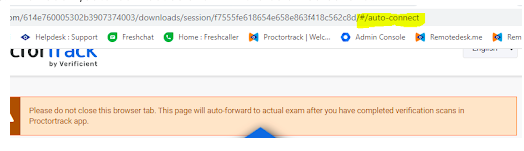
- Locate the URL in your browser's Location Bar (see screenshot below for example)
- Near the end of the URL, you will find the text "/session/", followed by a long string of alphanumeric characters, followed by a "/". The alphanumeric string is unique to every exam attempt, so yours will be different from what is pictured in the screenshot below. This is normal.
- Delete the contents of the URL after—to the right of—your unique identifier.
- Add the text #/auto-connect to the end of the URL.
- Your new URL should look like the example below (but with your unique identifier). It should end with this string: /session/<your_identifier>/#/auto-connect
- Once your URL looks correct, refresh the page in your browser.
If you are still stuck, please reach out to DEDP MicroMasters Support at dedp-micromasters-support@mit.edu for further assistance.
Comments
0 comments
Article is closed for comments.